
API Response
Interpret verification response fields, understand available data, and decide when to retry or fetch data endpoints.
Scenarios
After creating a verification, the API response includes four key fields that help you understand what happened and what to do next:
status: Indicates whether the verification process is still in progress or completed.data_available: Shows whether any data was retrieved.entities: Lists the datasets that were retrieved.can_retry: Tells you whether it makes sense to try again later.
Below are the possible scenarios and how to handle each one:
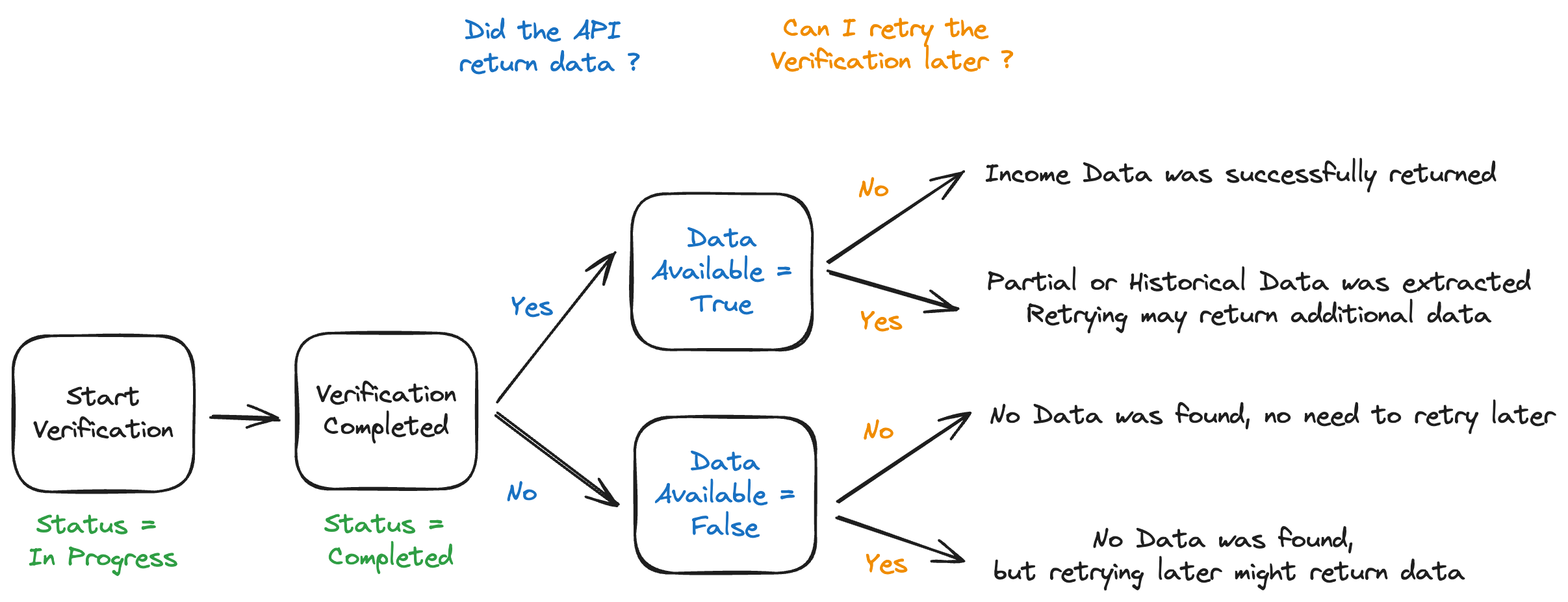
Verification Outcome
status
Indicates the current state of the verification process.
| Value | Meaning |
|---|---|
in_progress | We are still trying to retrieve data. |
completed | We have finished the data retrieval process. |
data_available
Boolean telling you whether Income and Employment data was successfully retrieved.
| Value | Meaning |
|---|---|
true | Data is available. Use the relevant data endpoints to fetch it. |
false | No data was retrieved. There is no need to call the data endpoints. |
You can calculate your Hit Rate using this field:
Hit Rate = Verifications with data_available: true / Total Verifications
entities
An array showing which types of data were successfully retrieved during the verification.
Each item corresponds to a dataset you can query with the API.
| Value | Meaning |
|---|---|
profile | Basic profile and employment status information is available. |
invoices | Invoice data is available through the /invoices/{identifier} endpoint for individual or business identifiers. |
employment | Employment history records are available through the /employments endpoint. |
employment_files | Employment documentation files are available through the /employment-files endpoint. |
earnings | Gig economy earnings data is available through the /earnings endpoint. |
business_profile | Business identity data is available through the /business-profile/{identifier} endpoint. |
| (empty) | No data was retrieved. |
Use this field to quickly identify which datasets you can access without having to call each endpoint individually.
can_retry
Boolean indicating whether retrying the verification later might return a different result.
| Value | Meaning |
|---|---|
true | A data source may have failed. Retrying later might return more data. |
false | Retrying would likely return the same result. No action needed. |
Outcome Matrix
You can use the following table to interpret the result of any verification:
data_available | can_retry | Meaning |
|---|---|---|
true | false | ✅ Data successfully retrieved. No need to retry. |
true | true | ☑️ Partial data retrieved. Retrying later might return more. |
false | false | ❌ No data found. Retrying will not help. |
false | true | ⚠️ No data found, but retrying may succeed if data sources were temporarily down. |
Use these fields together to guide users, avoid unnecessary retries, and decide which data endpoints to call.
Updated 5 months ago